Installing a home golf simulator is one of the most rewarding investments you can make in your game — and your home. But the process can feel overwhelming when you are starting from scratch. How big does the room need to be? What equipment should you choose? How much will it cost? These are all fair questions, and they all have clear answers once you break the journey down into manageable steps.
We have helped homeowners across Ireland design and install golf simulators in garages, spare rooms, garden buildings, and purpose-built extensions. Here is exactly how the process works, from your first idea through to your first swing.
Step 1: Define Your Goals
Before you look at a single piece of equipment, take a step back and think about what you actually want from your simulator. This is the foundation that every other decision rests on, so it is worth spending a bit of time here.
Ask yourself a few key questions:
- Is this primarily for practice or entertainment? A serious golfer looking to shave strokes off their handicap has different needs to someone who wants a fun space for family and friends at the weekend.
- Who will use it? If it is just you, the setup can be focused and compact. If children, partners, or guests will be using it regularly, you may want a larger hitting area and more forgiving enclosure.
- How often will you use it? Daily users tend to prioritise accuracy and data quality. Occasional users may lean towards entertainment features and a bigger screen experience.
- What is your budget range? Home golf simulators can range from a few thousand euro to well over twenty thousand. Having a realistic budget in mind early on saves time and avoids disappointment.
There are no wrong answers here. What matters is being honest about your priorities so that the setup you end up with actually matches your lifestyle.
Step 2: Assess Your Space
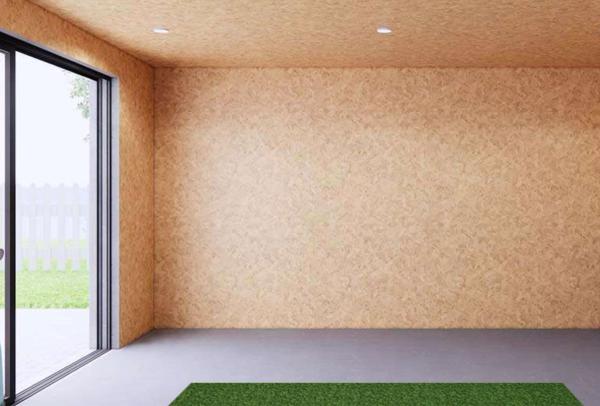
Space is the single biggest factor that determines what kind of simulator you can build. Too many people fall in love with a setup they have seen online only to discover their room cannot accommodate it. Getting accurate measurements early prevents costly surprises later.
Here is what you need to measure:
- Ceiling height: This is the most critical dimension. You need enough clearance to make a full swing with your longest club — typically a driver. As a general rule, you want a minimum of 2.7 metres (9 feet), though 3 metres or more is ideal. Taller golfers need more.
- Room width: You need enough width to swing freely without worrying about hitting a wall. A minimum of 3.5 metres is recommended, with 4 metres or more being comfortable for most golfers.
- Room depth: The total depth needs to accommodate the screen, hitting position, and the launch monitor behind or beside you. Plan for at least 4.5 metres of usable depth.
Beyond raw dimensions, look for potential obstacles. Beams, light fittings, radiators, pipes, and low-hanging fixtures can all interfere with your swing or limit where the screen can be positioned.
If you are converting a garage, check whether the garage door mechanism encroaches on ceiling height. In garden rooms, consider insulation, heating, and ventilation — you will generate heat when you swing, and a cold, damp space is not enjoyable to play in during an Irish winter.
Step 3: Book a Consultation
Once you have a sense of your goals and your space, the next step is to talk to someone who has done this before. A proper consultation is not a sales pitch — it is a collaborative design session where we figure out the best possible setup for your specific situation.
During a consultation, we will typically:
- Review your room dimensions and photos or visit the space in person
- Discuss your goals, budget, and any concerns
- Recommend equipment combinations that suit both your space and your objectives
- Identify any preparatory work you may need to do (electrical, flooring, lighting)
- Provide a clear, itemised quote with no hidden costs
To get the most out of the consultation, come prepared. Have your room measurements ready, photos from multiple angles, and a rough idea of your budget.
Step 4: Choose Your Equipment
This is where things get exciting. With your space assessed and a professional recommendation in hand, it is time to choose the components that will make up your simulator. There are four main elements to consider, and each involves trade-offs worth understanding.
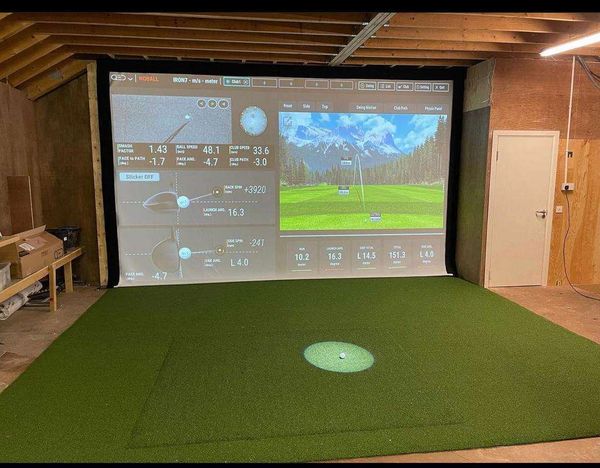
Launch Monitor: This is the brain of your simulator. It tracks club and ball data — speed, spin, launch angle, carry distance — and feeds it to the software. Options range from radar-based units like the Garmin Approach R10, which are affordable and compact, up to photometric systems like the Uneekor EYE XO2 or overhead units that offer exceptional accuracy and reliability.
Impact Screen: The screen is what you hit into, and it doubles as your projection surface. Screens vary in material, durability, and how well they absorb impact. A good screen reduces ball bounce-back, displays a crisp image, and lasts for years.
Projector: Your projector determines image quality, brightness, and throw distance. Short-throw projectors work well in tighter rooms where a standard projector would need to be mounted too far back. Look for at least 3,000 lumens for a bright, clear image.
Enclosure and Frame: The enclosure houses the screen and contains mishit shots. A solid frame keeps everything taut and properly aligned. Some golfers opt for a full cage-style enclosure with side nets and a ceiling baffle for maximum safety.
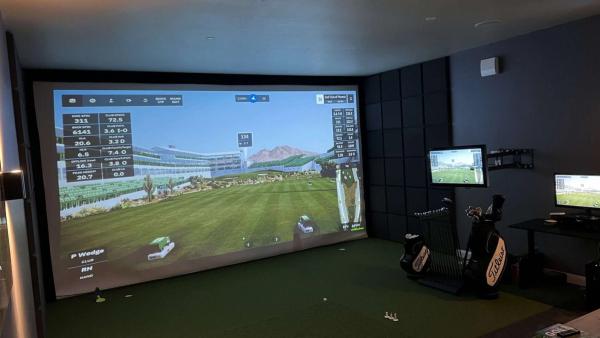
Beyond these four core elements, you will also want to think about hitting mats, flooring, lighting, and simulation software. Software platforms like E6 Connect, GSPro, and Awesome Golf each have their strengths.
Step 5: Installation Day
With everything ordered and your space prepared, installation day arrives. A typical installation takes between four and eight hours, depending on the complexity of the setup.
Here is what happens during installation:
- The enclosure frame is assembled and secured to the walls, floor, or ceiling as appropriate
- The impact screen is stretched and tensioned into the frame
- The projector is mounted and aligned to the screen
- The launch monitor is positioned and connected
- All cabling is routed cleanly and safely
- The system is powered up and calibrated
Calibration is a crucial final step. We test the launch monitor readings against known benchmarks, adjust the projector image for perfect alignment, and dial in the software settings. We then walk you through the entire system.
Step 6: Enjoy & Evolve
Your simulator is installed, calibrated, and ready to play. Now the real fun begins.
Most of our customers start by exploring the course library — playing Pebble Beach, St Andrews, or their favourite Irish courses from the comfort of home. Over the first few weeks, you will get a feel for how the data tracks your game.
But a golf simulator is not a static product. It can grow with you:
- Software upgrades: New courses, game modes, and training features are released regularly. Many platforms offer subscription models that keep your content fresh.
- Equipment upgrades: As your needs change, you might want to upgrade your launch monitor for better data, add side cameras for swing analysis, or switch to a larger screen.
- Social features: Online multiplayer modes let you play rounds with friends across the country — or compete in virtual leagues and tournaments.
- Ongoing support: We provide after-sale support for all our installations. Whether you need help with a software update, want advice on an upgrade, or have a question about maintenance, we are a phone call away.
The simulators that get used most are the ones that were planned well from the start. By following these six steps — defining your goals, assessing your space, consulting with experts, choosing the right equipment, having it professionally installed, and continuing to evolve your setup — you set yourself up for years of enjoyment and measurable improvement in your game.